Skip to content
Osaurus
Osaurus 1.0 · Free on the Microsoft Store

Own your AI.
On Windows.

AI agents that live on your PC. They read your files, run commands, browse the web, and keep working while you are away. Run open models on your own graphics card, or connect the cloud models you already use.

  • No account
  • x64 and ARM64
  • Native Windows app
  • Encrypted on disk
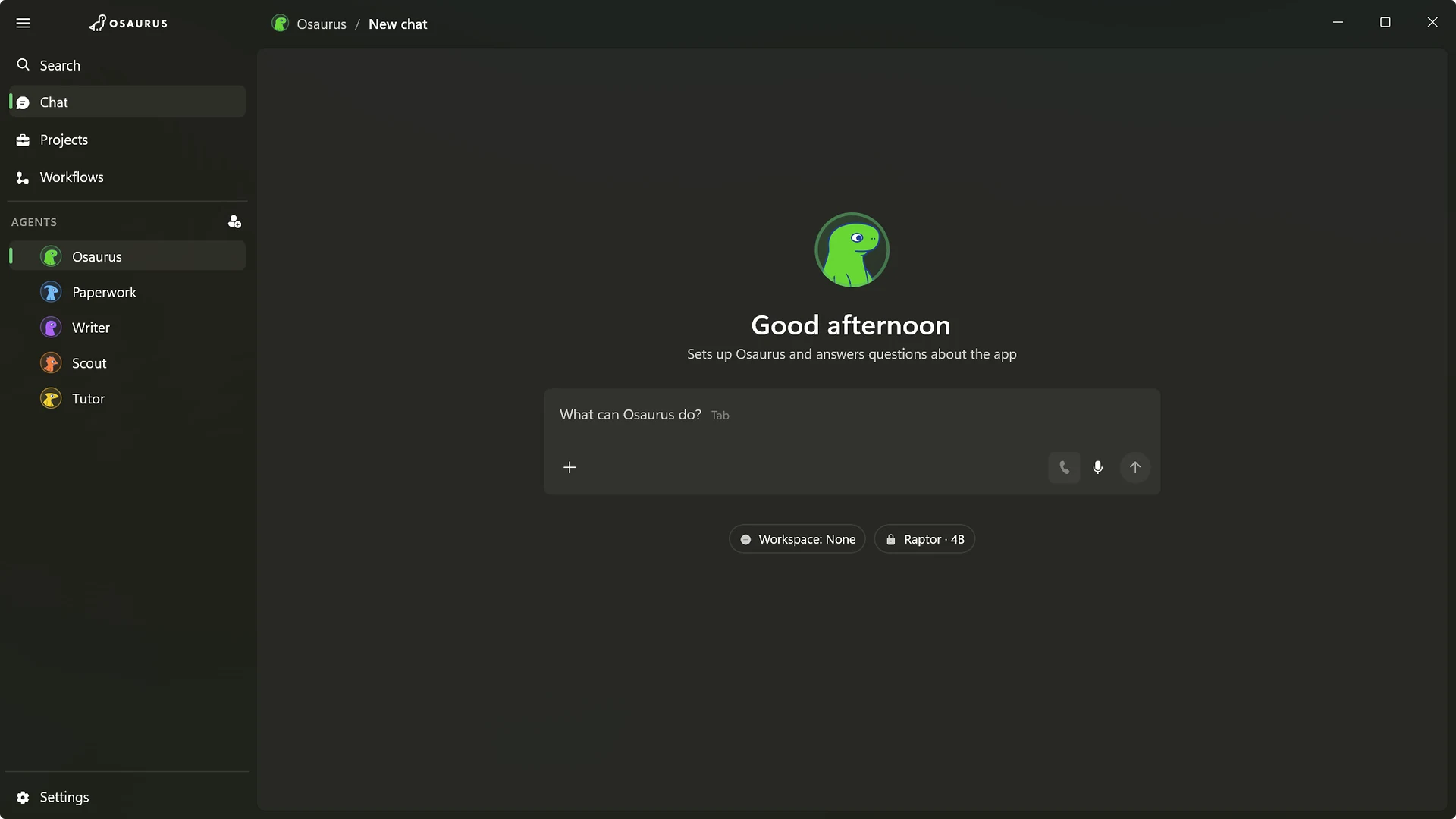
Osaurus for Windows on a new chat: the agents sidebar, a greeting from the Osaurus agent and the composer, running a local model.

Agents that do the work.

Osaurus does the job instead of handing you an answer to copy and paste. Give it a goal and a folder, and follow each step.

Agents

Ask once. It reads, runs, and reports back.

An agent reads the files, runs PowerShell and git, searches the web, and shows every step it took. For a bigger job, it hands parts to helpers, like one that researches while another writes, and brings their work back to you.

  • Reads and edits files, documents, and PDFs
  • Runs commands in PowerShell, with git built in
  • Hands bigger jobs to helpers, and shows what each did
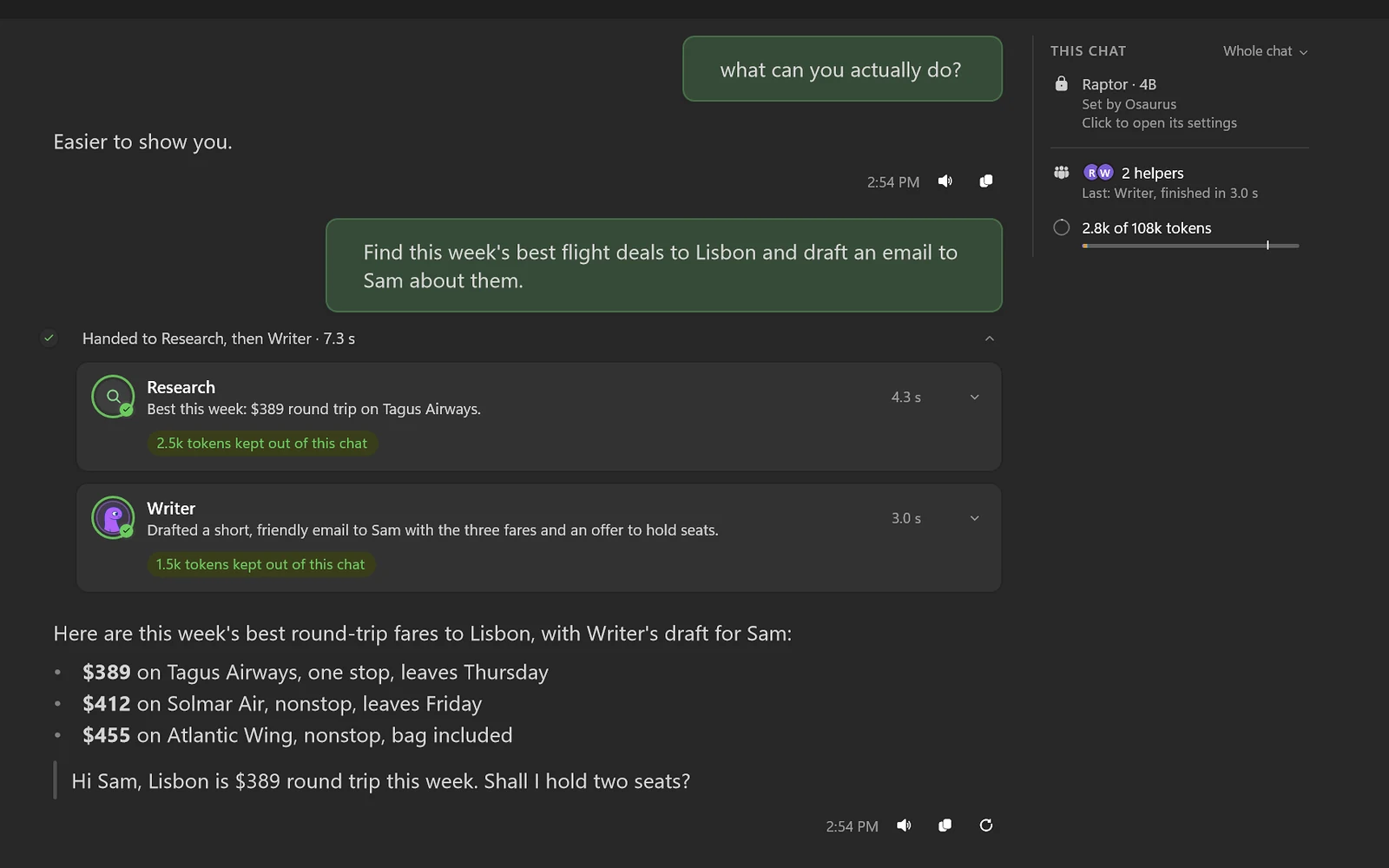
Osaurus after its helpers finished: three Lisbon fares from Research and a drafted email from Writer.
Browser

It browses the web for you.

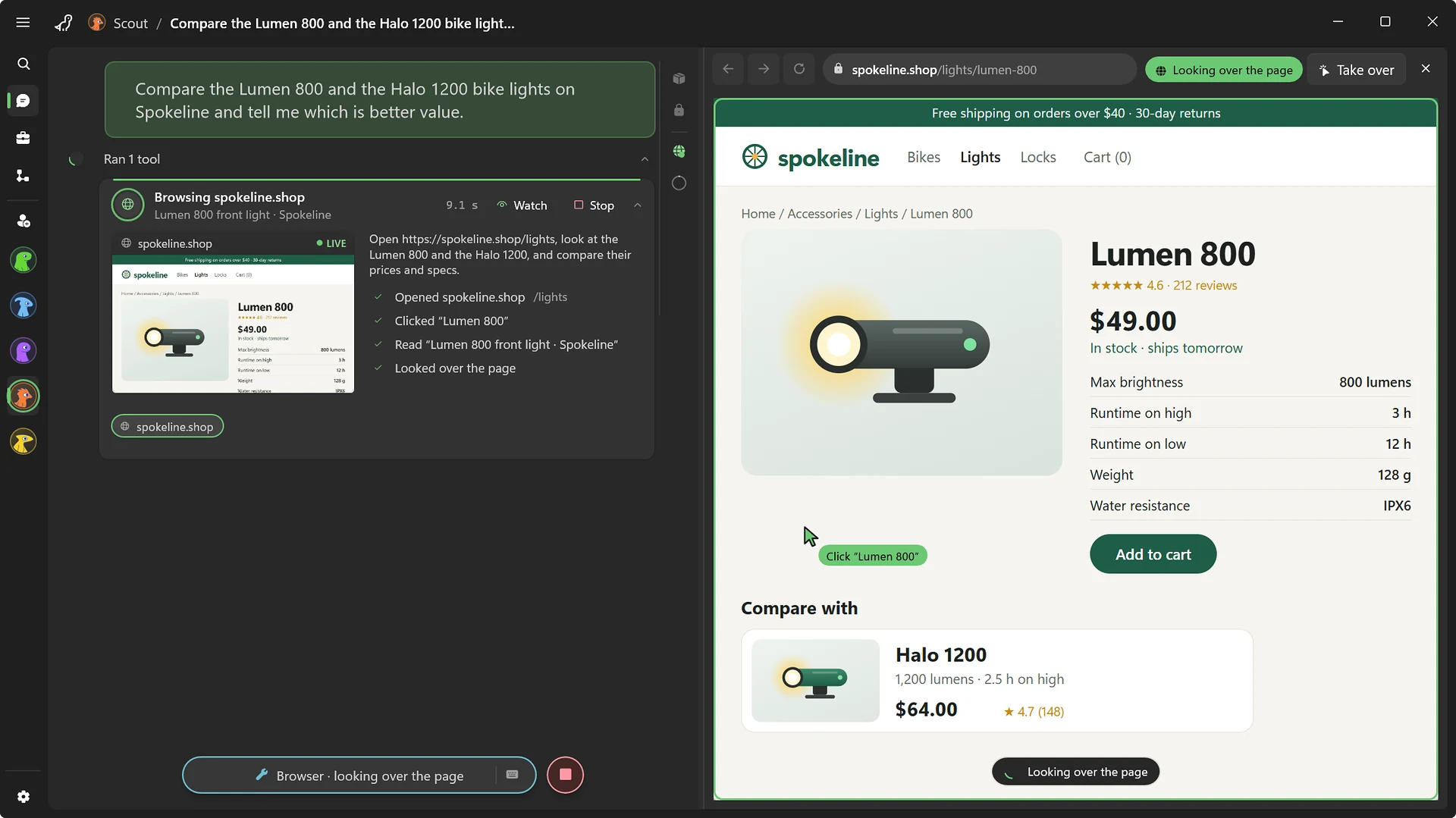
Ask it to compare two products, and it opens the pages in its own browser beside the chat. Watch it click through, take over when you want, then hand it back.

  • Opens, clicks, and reads pages in a built-in browser
  • Take over or stop it at any moment
  • Logins stay in an encrypted vault
The Scout agent browsing a shop in its own browser: the page beside the chat, the agent's cursor clicking a product.
Workflows

Do it once. Run it every Monday.

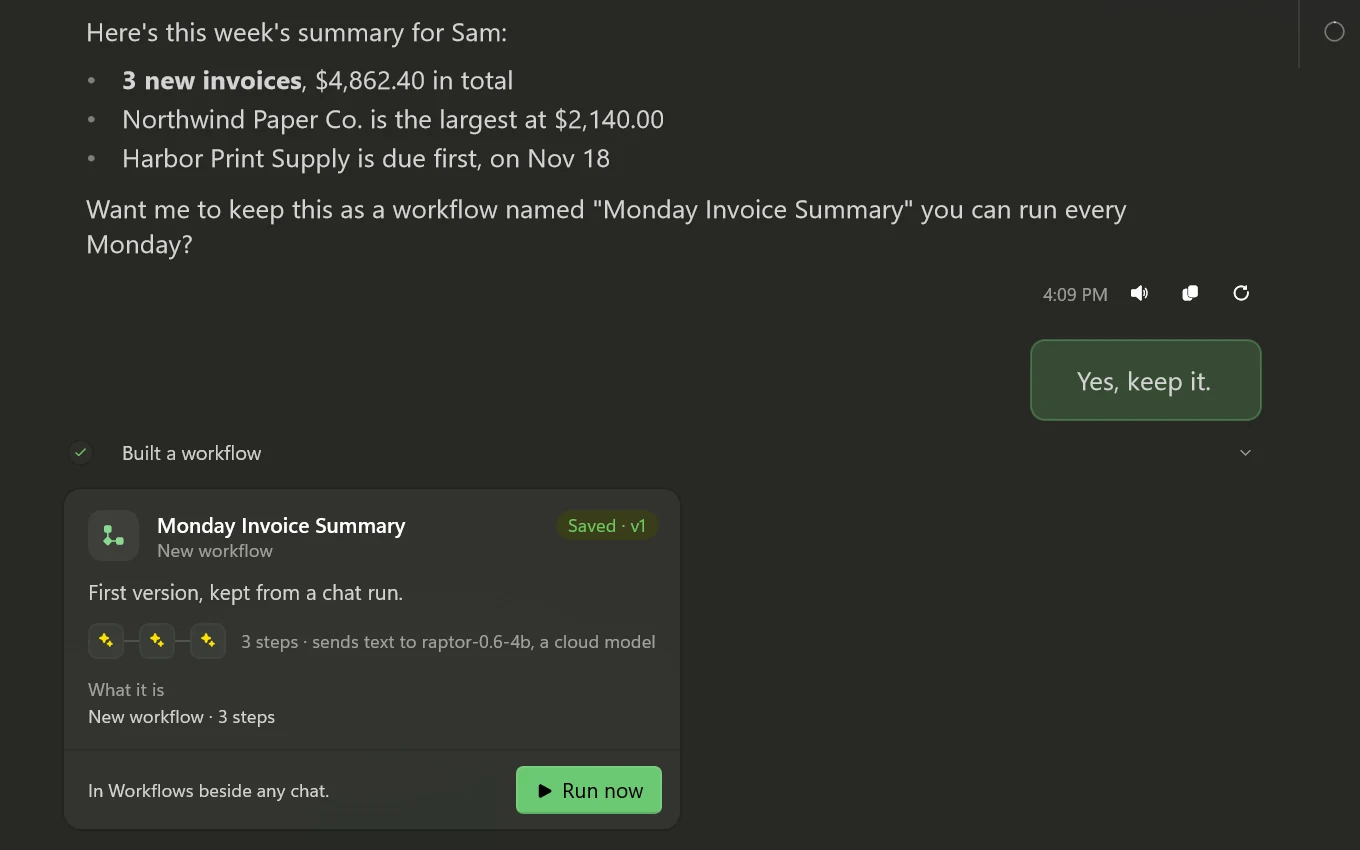
When a chat gets a job right, keep it as a workflow. Osaurus tests it before you save it, then runs it on a schedule or when a file lands in a folder.

  • Turn a chat into a workflow, tested before you save it
  • Runs on a schedule, or when a file lands in a folder
  • Choose the model each step uses
A week's invoice summary in the chat, then the workflow that makes it saved and ready to run.
Approvals

It asks before it edits.

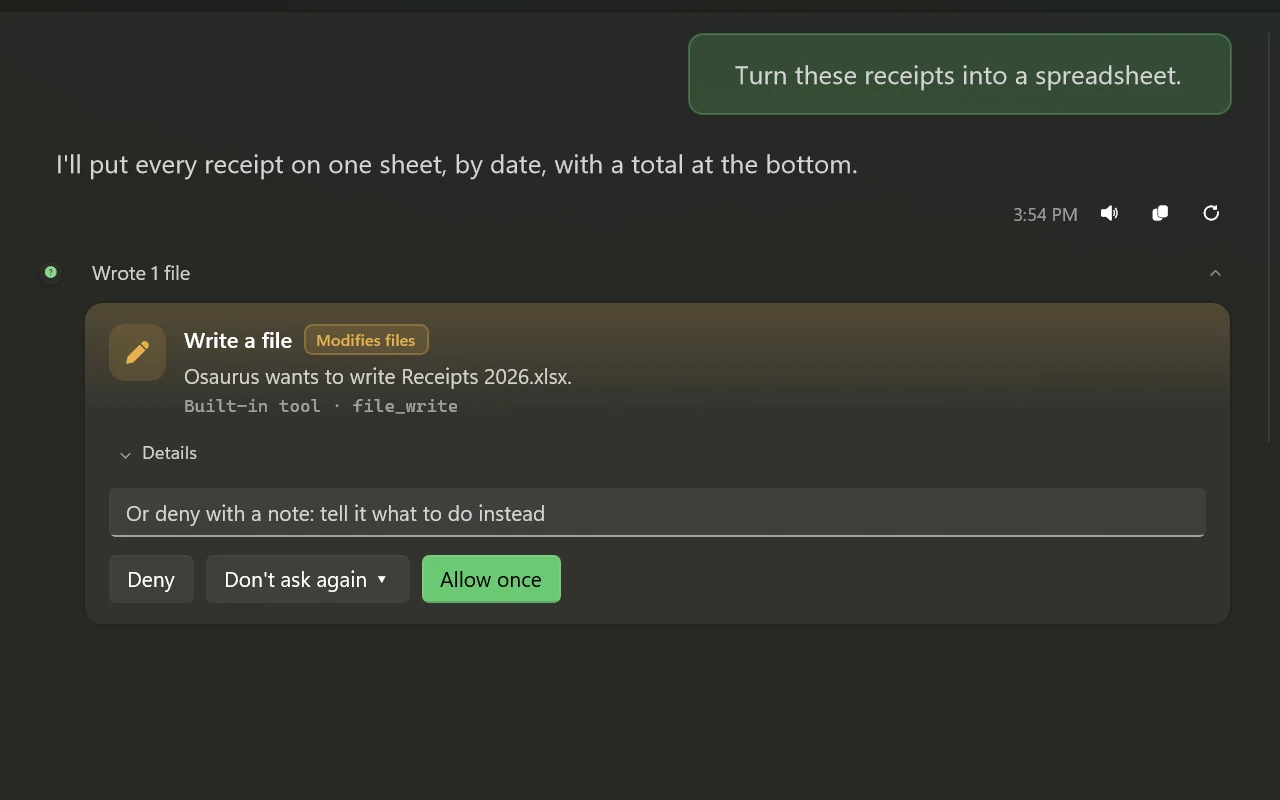
Agents ask before they edit a file or run a command. See the change, then allow it once, or always for that agent and folder. Every change is saved, so you can undo it later.

  • Approve inline, per agent and per folder
  • Every file change is saved and can be reverted
  • Set any agent to always ask, or never touch your files
An Osaurus agent on Windows asking before it writes a file: Deny, Don't ask again or Allow once.

Talk to it. Make things with it.

Call your agents, make pictures and short clips, and run open models on your own graphics card. When you do use the cloud, the Privacy Filter can hold back personal details first.

Voice

Call your agents.

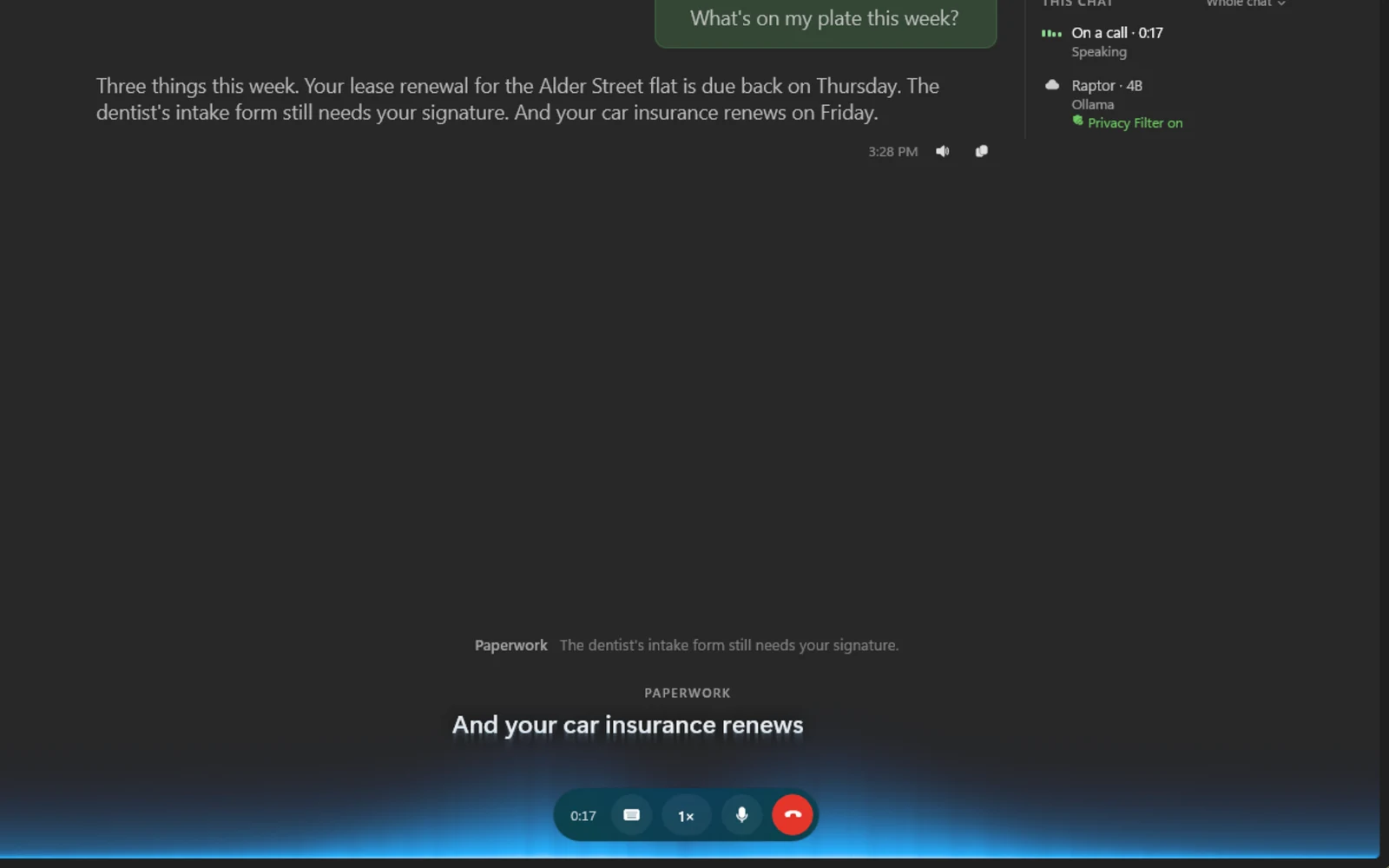
Start a call and talk it through. The agent answers out loud, with captions along the bottom of the window, and the whole conversation stays in the chat.

  • Call any of your agents
  • Captions of what you both say, as you say it
  • Works with models on your PC, too
A voice call with the Paperwork agent: its reply in the chat and the words it is speaking captioned along the window's bottom edge.
Images and video

Pictures and clips, made on your PC.

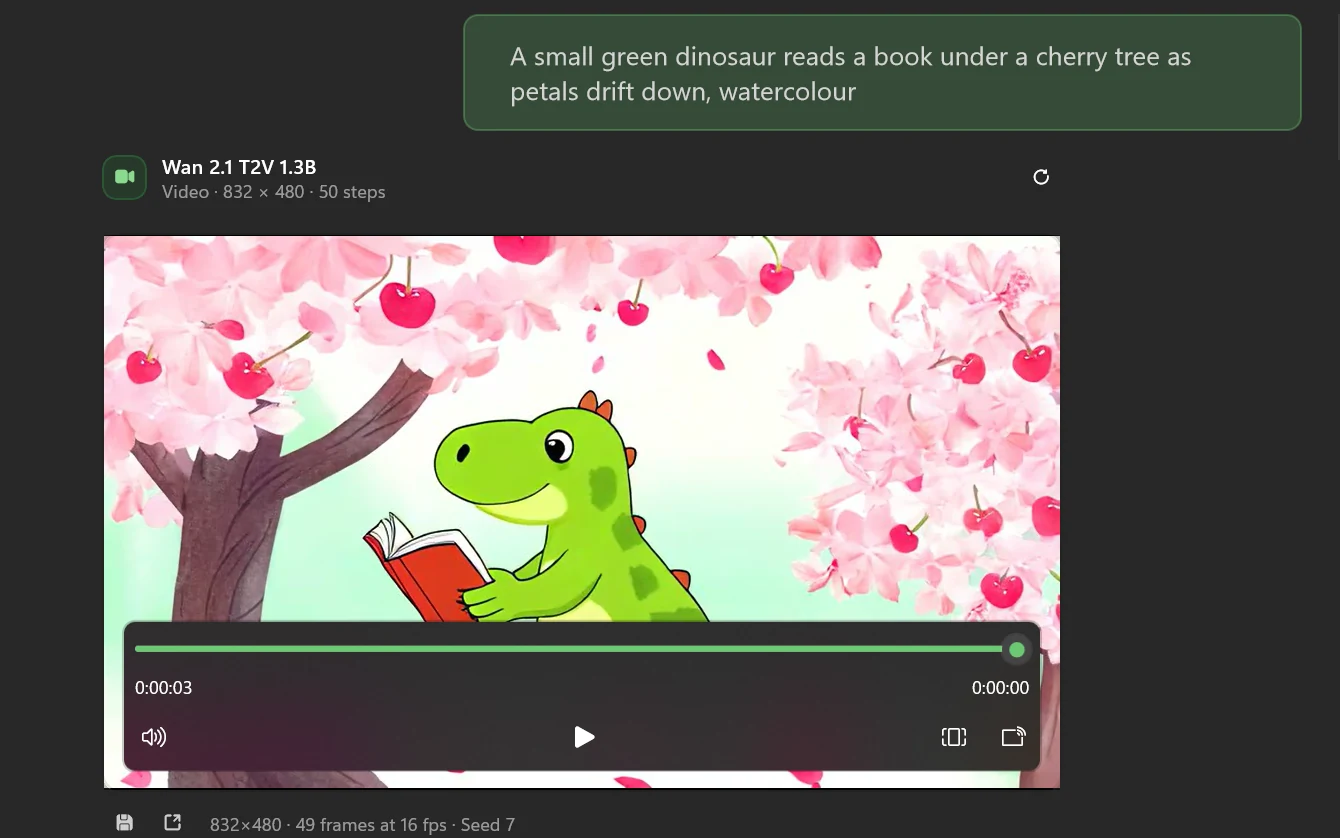
Describe a picture or a short clip, and an image or video model on your PC makes it. Watch the preview sharpen as it works. Nothing goes to an image service.

  • Pictures from a one-line prompt
  • Short video clips
  • Set the size, steps, and seed in the composer
A three-second watercolour clip of a dinosaur reading under a cherry tree, made on this PC from a one-line prompt.
Local models

Models that fit your PC.

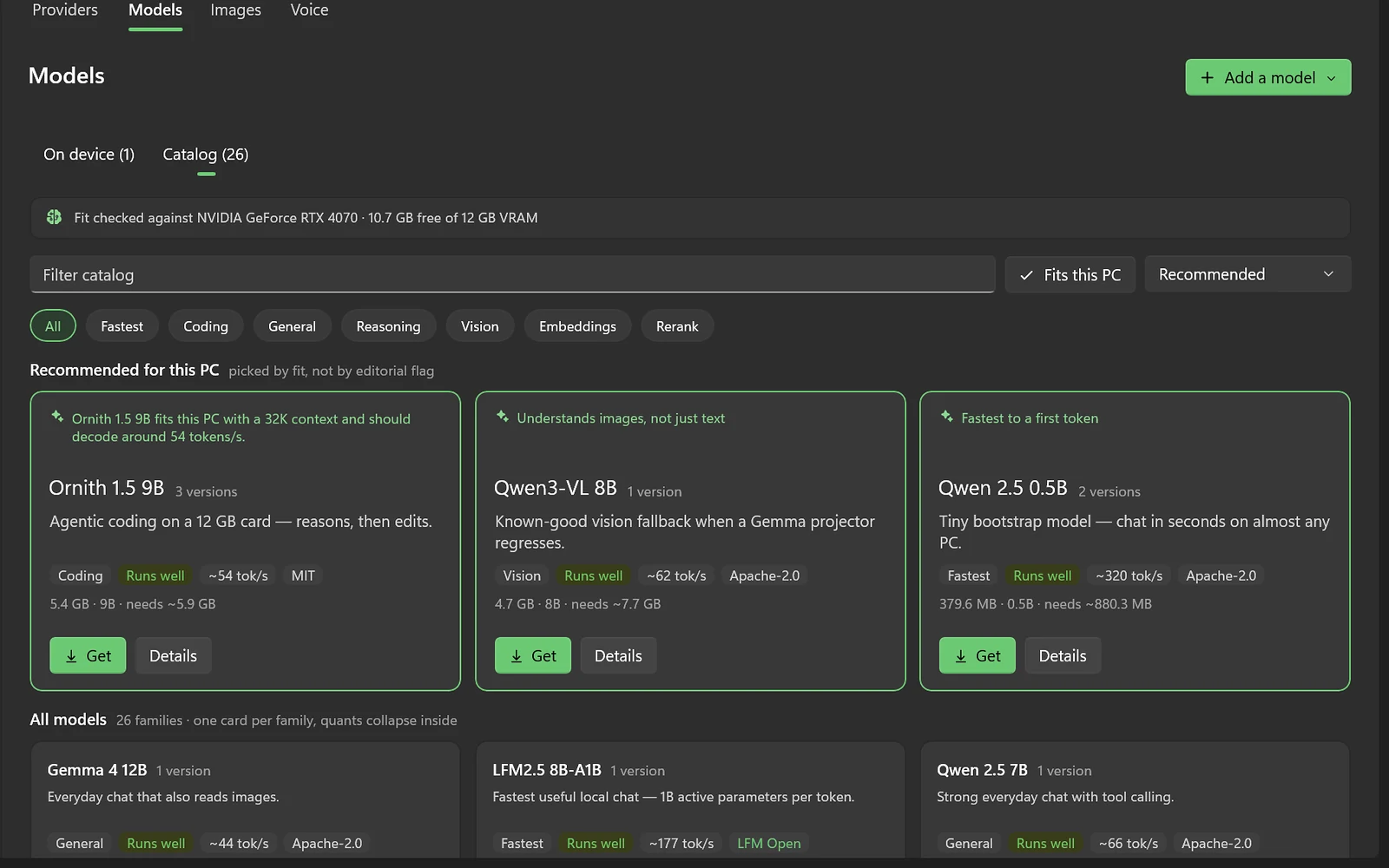
Osaurus checks your graphics card and memory and tells you what runs well before you download. It uses the fastest option your PC has: CUDA on NVIDIA, then Vulkan, then the CPU. Once a model is on disk, it works offline.

  • Qwen, Gemma, gpt-oss, Llama, and more from Hugging Face
  • Finds the models you already have in LM Studio and Ollama
  • Works with NVIDIA, AMD, and Intel graphics
The Osaurus model catalog recommending models that fit this PC's RTX 4070, with expected speed for each.
Privacy Filter

Fewer of your details in the cloud.

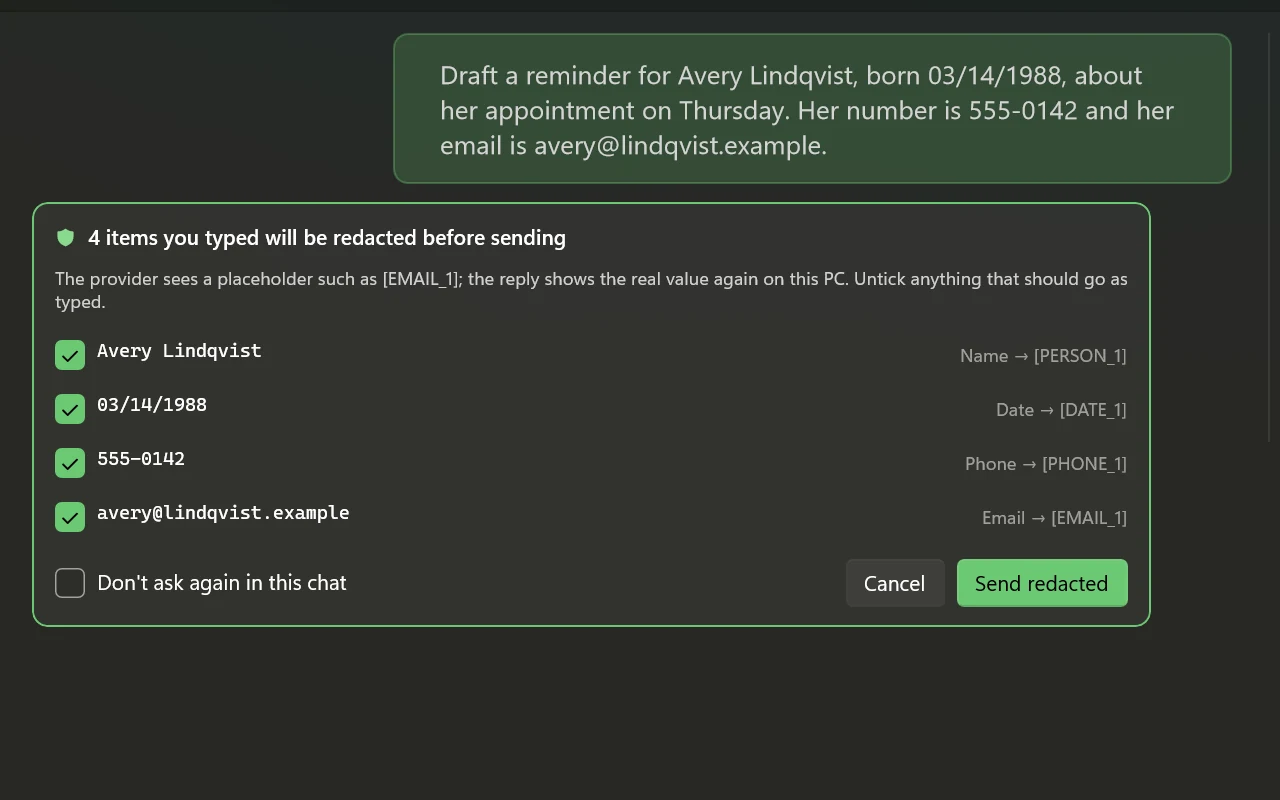
Before a message goes to a cloud model, the Privacy Filter swaps names, dates, phone numbers, and emails for placeholders. You see what it caught, and the reply shows the real values again on your PC. It can miss things, so check sensitive messages before you send.

  • Review it, and untick anything that should go as typed
  • See exactly what the cloud model received
  • A receipt of every value kept private in each chat
The Privacy Filter holding a message: a name, date of birth, phone number and email it will replace before sending.
iPhone and iPadBeta

Your PC, in your pocket.

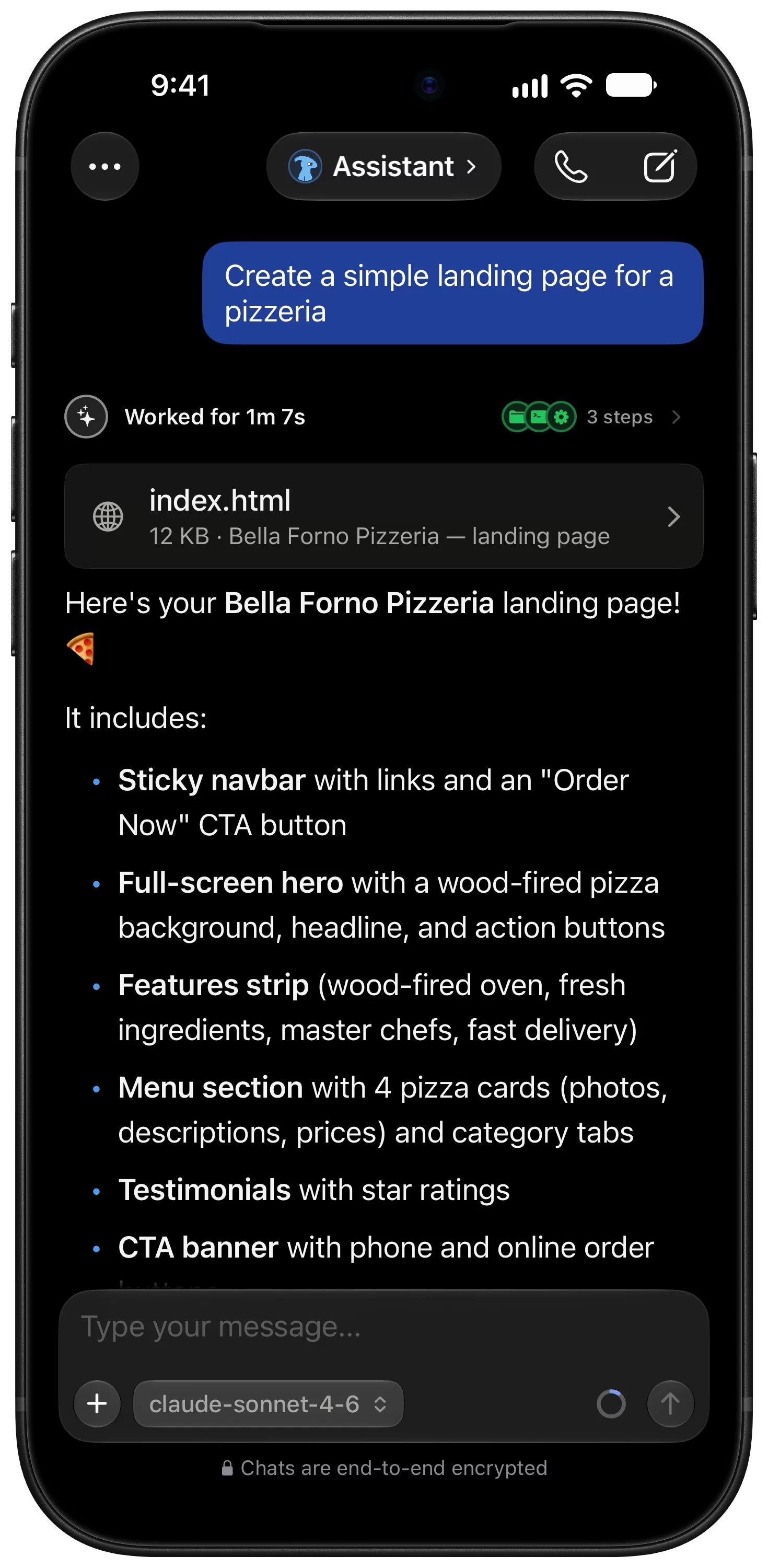
Pair the free Osaurus app for iPhone and iPad with Osaurus on your PC. Chat with your agents, call them, and make images away from your desk. The work still runs on your PC, with its models, memory, and tools.

  • Every agent on your PC, ready on the phone
  • Pair with a code from Settings, under Osaurus Connect
  • End-to-end encrypted, with no account and no cloud relay
  • Lock the phone, and the reply keeps going on your PC
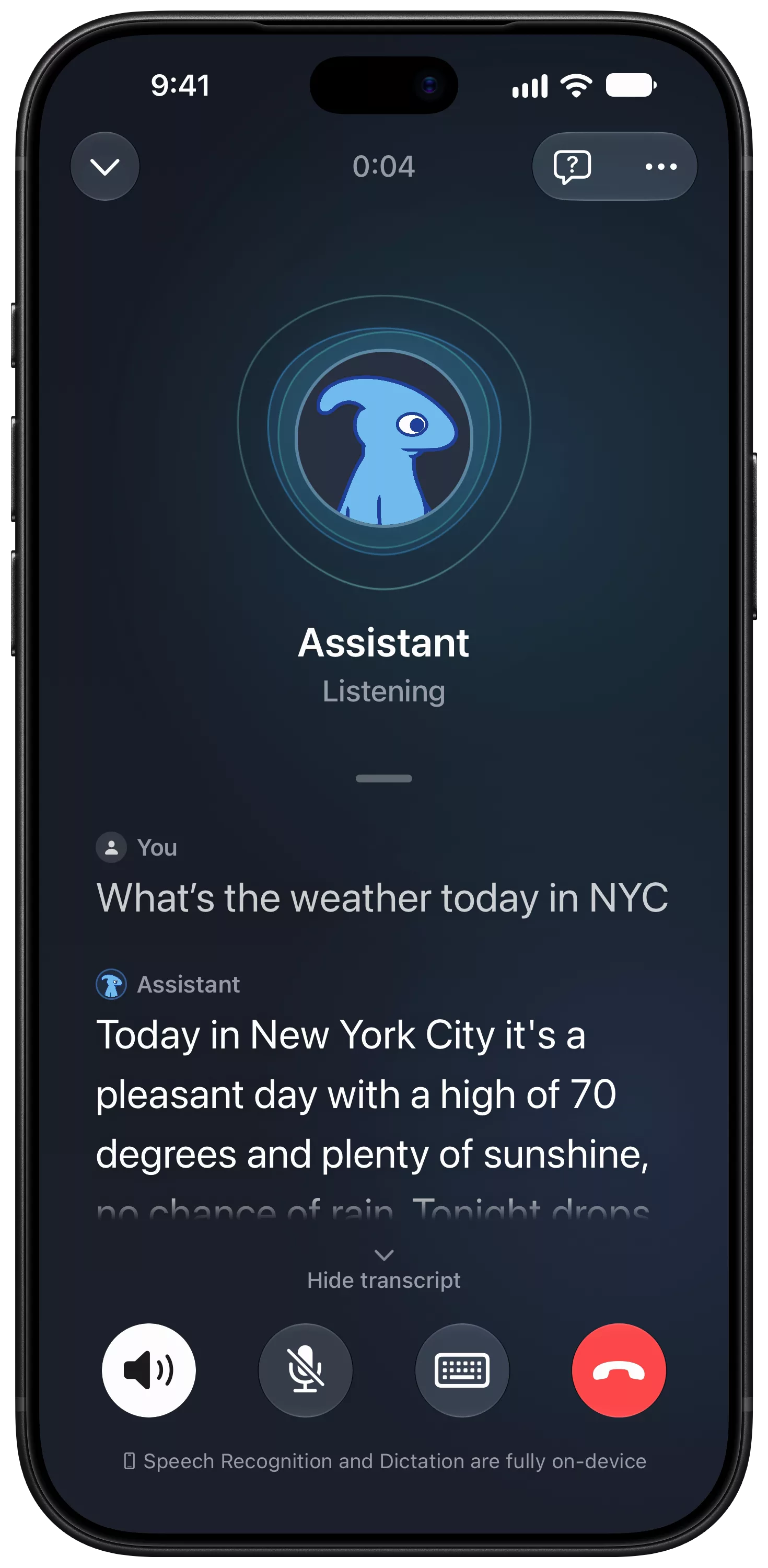
An agent on iPhone that built a pizzeria landing page, showing the steps it took and the index.html file it made.A voice call with an agent on iPhone, with a live transcript of a question about the weather in New York and its answer.

Everything else, built in.

There is nothing extra to install.

  • Projects keep work together.

    Give a project its own folder, files, instructions, and memory, and choose whether its data can reach the cloud.

  • Make your own agents.

    Describe the agent you want in a sentence. Osaurus drafts its name, instructions, and tools for you to check.

  • Message it from other apps.

    Talk to your agents from Telegram, Slack, or Discord, or connect them to n8n.

  • Share agents with your team.

    Join a Workspace to use your teammates' agents, with a shared pool of cloud credits.

  • Connect your tools.

    Connect MCP servers, including ones that use OAuth sign-in. Their tools go through the same approvals.

  • A local AI server.

    Point any OpenAI-, Anthropic-, or Ollama-compatible app at 127.0.0.1:1337, and it uses your models.

  • Memory and skills.

    Agents keep a memory of your work, with a note of where they learned each thing. Import new skills from GitHub.

  • A sandbox for code.

    Agents can install packages and run code in a Linux sandbox on WSL, away from your files.

One set of agents.
Any model you choose.

Choose a model for each agent and switch any time without losing its memory or skills. Run open models on your PC, sign in with a plan you already have, or bring your own keys.

Rather not manage keys? Osaurus Cloud credits give you frontier models from a prepaid balance. They are optional, and only for cloud models.

Sign in

  • ChatGPT
  • Claude Pro or Max, through Claude Code
  • xAI
  • OpenRouter

Your API key

  • OpenAI
  • Anthropic
  • Google Gemini
  • Azure OpenAI
  • DeepSeek
  • Venice
  • Any OpenAI-compatible endpoint

On your PC

  • Open models on your GPU
  • Ollama
  • Another Osaurus PC on your network
  • OpenAI
  • Anthropic
  • Google Gemini
  • xAI
  • OpenRouter
  • Venice
  • Ollama
  • LM Studio

Private by default.

Your chats, keys, and models live on your PC, and local models run there. Cloud models, web browsing, and connected services need a connection, and what they need goes to those services.

  • Encrypted on disk.

    Chats, memory, and keys sit in an encrypted database, locked to your Windows account.

  • Projects that stay local.

    Set a project to local models only, or fully offline, and no cloud model ever sees it.

  • No account.

    Install it and start. You only need an Osaurus account for cloud credits or Workspaces.

  • Diagnostics are your choice.

    Usage analytics and crash reports help us find and fix bugs. Turn either one off in Settings, under Data & privacy.

Runs on the PC you already have.

Any Windows 11 PC runs Osaurus with cloud models. Local models want a graphics card with 8 GB of video memory.

With cloud models

  • Windows 11
  • x64 or ARM64
  • Any graphics card, or none
  • An internet connection for the provider

With models on your PC

  • 8 GB of video memory or more: NVIDIA, AMD, or Intel
  • 16 GB of RAM
  • About 20 GB free for a typical model
  • Internet once, to download the model

No 8 GB graphics card? Use cloud models, and keep the agents, memory, and tools on your PC. On ARM64 laptops, local models run on the CPU unless the PC has an NVIDIA GPU.

Still have questions?

Ask the people who build it in the Windows community.

Get it from the Microsoft Store

Own your AI. On Windows.

Free on the Microsoft Store. No account, no subscription.

The newsletter

Release notes, new skills, and product news. No spam.

No spam. Unsubscribe anytime.